Video Annotation Services: How to Build a Tracking Dataset

You have annotated images before. The spec was a page long, the team hit a steady pace, and the estimate held. Then the project moved to video, and the same approach fell apart — the frame count exploded, reviewers slowed to a crawl, and nobody could say what “done” meant anymore.
That is not a scaling problem. Video annotation adds a requirement that image work never had: consistency across frames. This guide covers how to decide a sampling rate, how object tracking drives cost, how to set quality criteria that actually apply to sequences, and where in-house pipelines tend to break.
Table of contents
- When video annotation is different from image annotation
- Frame extraction and sampling rate: the first cost decision
- Object tracking and ID consistency
- Setting quality criteria for video
- Where in-house video pipelines break down
- What drives the cost of a video annotation project
- Starting with a PoC
- Frequently asked questions
When video annotation is different from image annotation
The most expensive assumption in a video project is that video is just a lot of images. Mechanically that is true — you extract frames, and each frame gets labeled. But the labeling task itself changes shape.
In image work, every item is independent. A frame is either correct or it isn’t, and a mistake on one image has no effect on any other. In video, three things stop being independent:
- Identity. The same object must carry the same ID from the frame it appears in to the frame it leaves. A box can be pixel-perfect and still be wrong, because it inherited the wrong ID.
- Ambiguity. A blurred or half-occluded object in a single image is simply a hard case. In a sequence, the annotator can look forward and backward — which means the correct answer depends on frames other than the one in front of them.
- The unit of review. Reviewers do not check frames. They check tracks: the full life of one object across a sequence. One bad handoff in the middle invalidates the whole track.
This is why an image-derived estimate under-reads video work. The per-frame effort may be similar, but specification, tracking and review are new line items.
ANOSUPO delivers video work as part of our image and video annotation service — that page covers what we handle and the formats we support. This article is the other half: how to design and scope the work before you request a quote.
If your project is closer to still images than to continuous footage, the type selection and pricing logic differ — see our guide to image annotation services.
Frame extraction and sampling rate: the first cost decision
There is no such thing as billing “per video.” A video is converted into frames, and those extracted frames are the items that get annotated. So the single decision that sets your total volume — and therefore your total cost — is how many frames per second you pull out.
The arithmetic is unforgiving. Ten minutes of 30 fps footage is 18,000 frames. Extract at 2 fps instead and the same ten minutes is 1,200 frames. That is a 15× difference in scope from one config value, before anyone has drawn a single box.
Sampling too densely
At high frame rates, consecutive frames are near-duplicates. You pay to label the same scene repeatedly, and the model gains very little from the redundancy — the dataset looks large but its effective diversity is low. Worse, a bloated dataset hides its own gaps: 18,000 highly correlated frames from one afternoon of shooting will not cover night, rain, or a crowded scene.
Sampling too sparsely
The opposite failure is quieter and more damaging. When objects move too far between sampled frames, tracking association becomes guesswork — annotators can no longer tell whether the object on the right is the same one that was on the left, or a different object entirely. Short events disappear completely: a pedestrian crossing the frame in half a second simply does not exist at 1 fps.
A workable rule is to set the rate from how far your objects move between frames, not from habit. Slow, wide scenes tolerate sparse sampling; fast objects close to the camera do not. Different clips in the same project can legitimately use different rates, and deciding that up front is cheaper than re-extracting after production has started.
If your project also includes still-image data, the workflow for that side is covered in our guide on creating training data for YOLO, which walks through the same steps without the temporal layer.
Object tracking and ID consistency
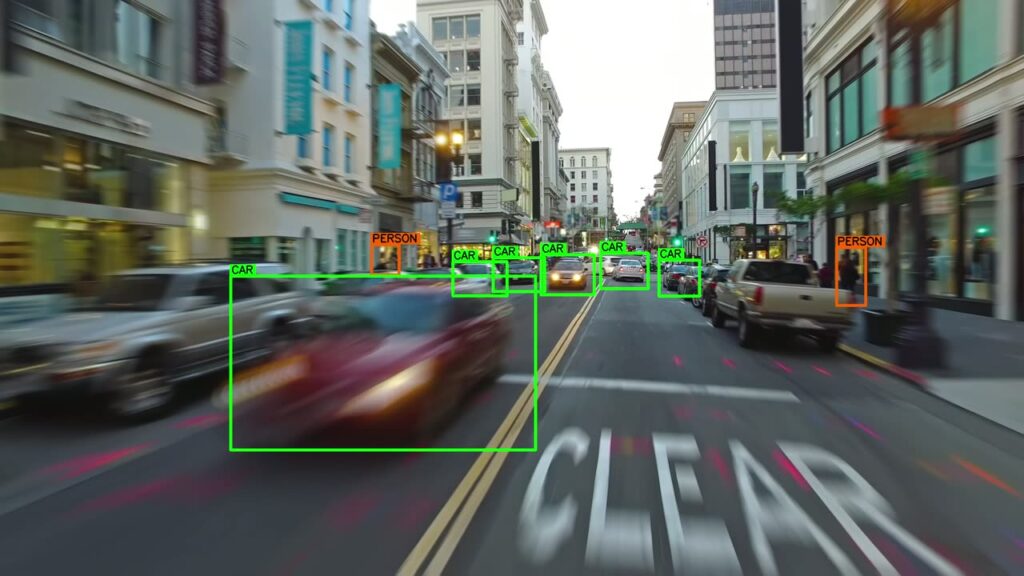
A track is the sequence of boxes belonging to one object across the frames it appears in. Object tracking annotation means assigning and maintaining those IDs — and it is where video projects usually lose their schedule.
Three situations create almost all of the difficulty:
- Occlusion. A car passes behind a truck for twelve frames and comes out the other side. Is that one track with a gap, or two tracks? Whatever you choose, every annotator has to choose the same way.
- Exit and re-entry. A person walks out of frame and returns forty frames later. Do they keep their original ID, or get a new one? Re-identification across a long gap is genuinely hard for humans, not only for models.
- Look-alike objects. Two similar objects cross paths and the IDs swap. Every frame is individually correct; the sequence is wrong. This defect class — the ID switch — is invisible to any frame-level check.
The practical consequence is that your spec has to answer these questions before production, in writing:
- How many frames of full occlusion before the object is treated as a new track?
- Are partially visible objects labeled, and from what visible fraction?
- Does an object that leaves and returns keep its ID, and over what time window?
- Do you need attributes that can change mid-track — occluded, truncated, an activity state?
Interpolation between keyframes reduces the drawing labor considerably. It does not reduce the judgment. Deciding identity across an occlusion is a human call every time, and that is the part that scales with sequence length rather than with frame count.
Setting quality criteria for video
If your acceptance criteria are written per frame, they will pass a dataset that is unusable. A frame-level accuracy figure treats the ID switch above as a rounding error, because only a handful of frames are affected.
Evaluate at the track level instead. In practice that means three questions per sequence:
- Does each real object correspond to exactly one track, with no ID switches?
- Is any track fragmented into pieces that should have been joined across an occlusion?
- Are the box boundaries stable, or do they jitter frame to frame around a static object?
The third one matters more than it looks. Boundary jitter across an otherwise correct track teaches a detector that the object’s extent is noisy, and it comes directly from annotators working frame-by-frame without playback review.
This is also why our inspection model is full-volume inspection rather than sampling-based spot checks. Sampling assumes defects are randomly distributed; in video they are not. They cluster exactly at the hard moments — occlusions, crossings, scene cuts — which a random sample of frames will usually miss. Across projects we hold a measured 99.7% quality consistency, and defects attributable to us against the agreed spec are corrected free of charge for one year after delivery.
Where in-house video pipelines break down
Teams that handled their image datasets internally often assume video is the same work at a larger size. Three specific points tend to break, and they break in this order.
1. Volume
Frame extraction multiplies your dataset by one or two orders of magnitude overnight. A team that comfortably labeled 3,000 images a month is not going to absorb 60,000 extracted frames by working harder. Our client Pirika hit this wall with environmental video data: after moving to us, annotation costs fell to roughly half, processing scaled to 100,000 items a month — the previous vendor handled a few thousand — and cumulative delivered data passed one million items.
Data for environmental AI half the cost, at scaleCase study: Pirika's litter-survey AI "Takanome." ANOSUPO took on annotation of ever-growing video data, cutting cost to about half and scaling throughput to 100K items a month and 1M+ delivered — a data foundation in-house work could never reach.annotation-support.com
2. Review capacity
Frame labeling parallelizes cleanly across people. Track review does not: checking identity requires watching the sequence in order, so the reviewer is a serial bottleneck no matter how many annotators you add. In most in-house setups that reviewer is the ML engineer who owns the model — the most expensive person on the project, spending their week scrubbing playback.
3. Spec drift
Halfway through, someone decides that objects under 20 pixels should be skipped, or that re-entering objects keep their ID after all. In image work you re-label the affected images. In video, a rule change about identity retroactively invalidates every track that crossed an occlusion — including ones already reviewed and signed off.
None of these means outsourcing is automatically correct; the trade-offs are laid out in our guide to data annotation outsourcing. What they do mean is that the decision should be made before extraction, not after the review queue has already backed up. If the footage itself is sensitive — recorded in public space, on a work site, or containing faces and plates — our handling of that is documented on our security page; we are certified to ISO/IEC 27001, work cloud-only with no local retention, and never reuse client data to train our own models.
What drives the cost of a video annotation project
Because video is annotated as extracted frames, our published per-item rates are what apply once extraction is done. There is no separate “per second of video” rate, and any vendor quoting one is making an assumption about your sampling rate on your behalf.
| Type | Published rate (excl. tax) |
|---|---|
| Bounding box (object detection) | from $0.036 / label |
| Keypoint (pose estimation) | from $0.021 / point |
| Segmentation | from $0.152 / region |
| Setup / fixed cost | $0 (actuals only) |
Four variables move the total, and you control all of them at design time:
- Annotation type. Boxes, keypoints and segmentation differ by roughly an order of magnitude per item. Ask whether your model genuinely needs pixel-level regions across every frame, or only on a subset.
- Object density. Cost is per label, not per frame. Eight objects in frame costs eight times what one object costs, so a crowded scene is a different project from an empty road.
- Sampling rate. Covered above, and the largest single lever you have.
- Tracking. Whether you need persistent IDs at all. If your model only needs per-frame detection, dropping the identity requirement removes the most judgment-heavy part of the work.
Pricing is fully usage-based with no initial cost and no minimum order — full details are on our pricing page. Because the frame count depends entirely on your footage and sampling decisions, we quote video projects individually; send us a representative clip and the spec questions from H2-3 answered, and you can request a quote against real numbers rather than an assumed frame rate.
Starting with a PoC
Video specifications are hard to get right on paper, which is why we do not recommend committing a full dataset up front. The path we suggest has three stages.
Free trial. We annotate roughly 10 to 50 items of your real data with our production team, so you can assess actual quality before placing any order. This is not a sales demo run by a specialist — it is the workflow you would get.
PoC. There is no minimum-order requirement. For image annotation we flexibly take on PoCs from around 50 to 100 items, which for video means a short representative sequence rather than a clip count. Choose the difficult footage here: the crowded intersection, the low-light clip, the one with the occlusion you argued about internally. A PoC on clean footage tells you nothing you needed to know.
Production. Once the spec survives contact with hard data, scale up. Because billing is per item with no fixed fees, scope can move up or down between batches without renegotiating a contract.
One practical note for teams working with footage or documentation in Japanese: our annotators are Japanese-native, so specs, edge-case discussions and on-site terminology do not have to be translated into English before work can start.
Frequently asked questions
How many frames do I actually need?
There is no universal number, and any figure quoted without seeing your footage is a guess. What determines it is scene diversity rather than raw count — a thousand frames covering varied lighting, densities and object behaviors will outperform ten thousand near-duplicate frames from one recording session. Start by extracting at a rate where objects move a visible but trackable distance between frames, run a PoC on that, and adjust once you can see where the model actually fails.
Do you handle tracking IDs across long sequences?
Yes. We handle object tracking with IDs maintained across frames, including cases where objects are occluded, leave the frame and return. The rules for those cases — how long a gap before a new ID is issued, whether partially visible objects are labeled — are agreed with you in the specification before production starts, because they are project decisions rather than technical defaults.
What happens if our annotation spec changes mid-project?
We handle it, but it is treated as a scope change rather than a correction. Our one-year free correction covers defects on our side measured against the agreed specification; a changed specification is different work, and in video a change to identity rules can invalidate tracks that were already delivered and accepted. We will tell you which completed batches are affected and re-quote before redoing anything, so there is no surprise. This is the main reason we push hard on settling the occlusion and re-entry rules during the PoC.
Can we test quality before committing?
Yes. Our free trial covers roughly 10 to 50 items of your own data, annotated by the same team and workflow that would run your production batches. Every deliverable — trial included — goes through full-volume inspection rather than sampled spot checks.
Summary
Video annotation is not image annotation at a larger volume. The added requirement is consistency across frames, and it shows up in three places: the sampling rate that sets your total scope, the identity rules that drive most of the judgment cost, and the track-level criteria that determine whether a delivered dataset is usable. Decide all three before extraction, and validate them on your hardest footage rather than your cleanest.
Try our quality on your own data — for free.